For a list of BASHing data 2 blog posts see the index page. 
Format musings 3; the last "BASHing data" post
There are more than 20 lightweight markup languages (LMLs). They all do the same job, which is to annotate plain text with characters already on your keyboard. The annotations tell some other program how the plain text should be formatted.
The most widely used LMLs are probably Markdown and its variants, like GitHub Flavored Markdown.
I could be wrong, but I suspect that the vast majority of Markdown files are text files for which the target is a Web browser. In other words, you use the LML to tell another program (say, pandoc or a browser extension like Markdown Viewer, or an online parser) to convert the LML'ed text file to valid HTML. Meanwhile, the editing of Markdown files is best done in a dedicated Markdown editing program (like ReText) that offers a live "HTML-like" preview of the Markdown rendering.
Because I work so much in the terminal and in a text editor, I'm sort of bemused by all this format-hopping. I write websites like this one directly in a text editor that offers HTML syntax highlighting and syntax error flagging. How much time would I save by not having to type <p> or <em>? Not a lot. And much of what I write for the Web is formatted with CSS, which LMLs can't help with.
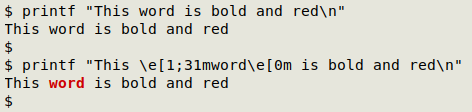
But the Web isn't the only place where plain text can be formatted with annotations. You can do that in a terminal emulator as well. Most command-line folk would know about coloring and bolding text with ANSI escape annotations:
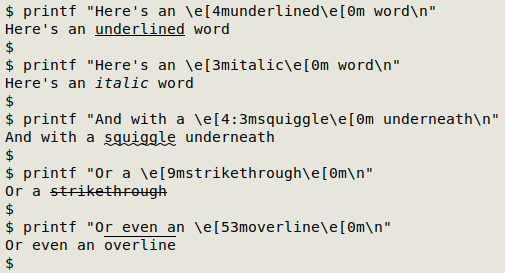
There are escapes for other text effects, too:
And inevitably, someone would write a program to annotate text just for the terminal. It's called terminal-markdown and it was written in C by USA developer Jack Evoniuk.
By default it creates the folder "terminal-markdown" (containing the executable) in your home directory. Put that folder in your $PATH and you're ready to go with the command "tmd" and fore-and-aft special characters. For example, here are underlining and italic:
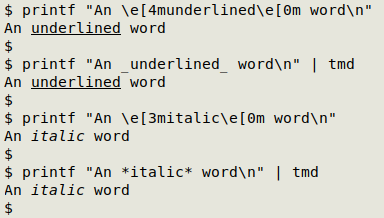
See the "terminal-markdown" GitHub page for more examples. If you're writing for the terminal, it's a neat way to avoid complicated ANSI escapes.
For rendering ordinary Markdown in a terminal, glow is pretty impressive, notably with tables and hyperlinks.
But I have to confess, I'm a plain-text person. Text effects and other fancy formatting are fine when needed for webpages and ODT/PDF documents, but I'm always happy to write and read unformatted text. No HTML emails, thank you.
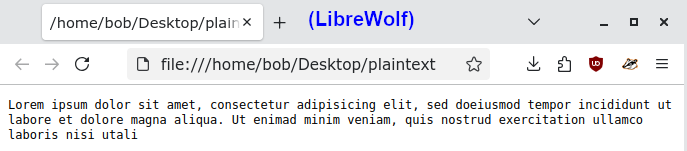
And here's an apparently little-known fact: a Web browser can render a plain text file as-is with the browser's default font. Font size can be increased or decreased with Ctrl + and Ctrl -. And you can even use a browser as a text editor.

This is post number 100 in the BASHing data 2 series, and also the last. There are 300 BASHing data posts in total and I will keep them all online for some years.
Both of the BASHing data series are archived in Zenodo here and here, together with A Data Cleaner's Cookbook, the online resource for which the blog posts were intended to be companion reading.
It's been great fun putting these blog posts together. I hope they remain as useful to data workers (and other command-line people) as they have been for me. Like many other bloggers, I've used the blog format to store my ad hoc solutions to problems I encountered in my work.
I've only mentioned AI twice in these blogs (once just now). I don't doubt that some of my code has found its way into AI-generated answers to questions. That's fine with me, although it would be nice to be linked or attributed in those answers, and I suspect that doesn't happen. For the record, there is no AI-assisted content whatsoever in the BASHing data series.
Last update: 2025-12-26
The blog posts on this website are licensed under a
Creative Commons Attribution-NonCommercial 4.0 International License